In short
- Context length decides whether a model fits. The same 5.3 GB model took 18 GB and spilled onto the CPU at a 131K context, but used 6.8 GB entirely on the GPU at 16K.
- Three models cover everything I need: a 7B model for autocomplete, Qwen 3.5 9B for chat, documents and small code changes, and Qwen 3 Coder 30B, a mixture-of-experts model that runs well despite not fitting in VRAM, for larger coding tasks.
- The coding agent needs a 32K context and a small output reserve, or it summarises its own conversation in an endless loop.
- The dangerous failures looked like successes. Models reported work as done when nothing was saved, or when the saved file still had errors. Check files, diffs and tests, not summaries.
- A six-step setup, with a check for each step, is at the end.
Why I did this
I write the core logic of my projects myself. I wanted local models for the work around it: boilerplate, documentation, tests, consistency checks, questions about my own code and documents. I also wanted to do that without sending project files to a cloud service by default. Cloud models stay available for when speed or certainty matters, but the goal is to need them less, not to treat them as a permanent backup.
I had built a local setup once before, in August. When I came back to it in September and compared
my notes with the machine, I found eleven contradictions. The nine models I had benchmarked were
all gone. The context-length setting my notes called "permanently set" existed but was empty. The
coding app's local provider was switched off by a single flag ("enabled": false) while its
instance settings said true. So every "model failure" in my previous test round had been
measuring a route that was never open.
I started again. This time I checked every result against what was actually on disk, not what a model or my own notes claimed. This article covers what survived, what failed, and the shortest path I know to reproduce it.
The machine, and the one number that matters most
| Part | Specification |
|---|---|
| OS | Windows 11 Pro |
| GPU | NVIDIA RTX 3060, 12 GB VRAM |
| RAM | 32 GB (31.8 GB usable) |
| CPU | Intel i5-12400 class, 6 cores / 12 threads |
| Storage | Models on a separate data drive (about 28 GB for the final set) |
There are two memory budgets. Video memory (VRAM) is fast. System RAM is slow, but a model that does not fit in VRAM still runs from it.
Context length is the memory you don't see
The first measurement changed how I made every later decision. I loaded one model twice in the
same session and changed only the context length. The model was granite4.2:8b, 5.3 GB on disk:
| Context length | Loaded size | Where it ran |
|---|---|---|
| 131,072 tokens (the server default) | 18 GB | 42% CPU / 58% GPU |
| 16,384 tokens | 6.8 GB | 100% GPU |
On a 12 GB card, the context length, not the size of the weights, is what decides whether a model fits. Set the context length before you compare models. Otherwise you are comparing memory settings, not models.
"Too big" depends on the architecture
qwen3-coder:30b is a mixture-of-experts model: 30B parameters in total, but only 3.3B are
active for each token. At a 32K context it loaded at 20 GB, split 48% CPU / 52% GPU, and still
generated 33.5 tokens per second. A dense 24B model (devstral-small-2:24b) loaded at 16.2 GB,
split 39% / 61%, and generated 4.8 tokens per second. The larger model was about seven times
faster. If a model looks too big for your GPU, check whether it is a mixture-of-experts model
before you rule it out.
How I tested
- Check the file, not the summary. Each task had an independent checker that read the saved files. For the coding tasks, a hidden checker scored both a reference solution and the untouched starting code first. On the hardest task, the reference scored 19/19 and the untouched code 7/19, so a model had to change things to score above 7.
- Run a control first. Before any real task in an app, ask the model to write a one-line file, then compare the bytes on disk. This separates "the model can't use tools" from "the tools were never reachable", which was exactly the question I could not answer about the first setup.
- Change one thing per retry. I kept every failed attempt as it happened and recorded exactly what changed before the next one.
- Know what the tests cover. These are small tasks on one machine, mostly single runs. They show what works on this setup, not a general ranking of models.
What I ended up with
Every app here talks to Ollama, which runs the models on the GPU. On top of it:
- T3 Code (source), an open-source desktop app for running coding agents. Here it runs OpenCode, an open-source coding agent, against the local models.
- Jan, a desktop chat app that can use tools.
- AnythingLLM, which answers questions from your own documents, with citations.
- VS Code with Twinny, for autocomplete only.
I tried fourteen models; three stayed. They cover four jobs across four apps:
| Job | App | Model | Tested result |
|---|---|---|---|
| Autocomplete while typing | VS Code + Twinny | qwen2.5-coder:7b-base | 0.2–0.9 s per suggestion once loaded; 6/8 completion checks vs 2/8 for the 3B |
| Small code changes | T3 Code (OpenCode agent) | qwen3.5:9b, 32K variant | Multi-step task 12/12 in 75 s |
| Larger code tasks | T3 Code | qwen3-coder:30b, 32K variant | Harder task 19/19 twice, 7–9 minutes each; the 9B scored 15/19 |
| Chat, screenshots, spreadsheets | Jan | qwen3.5:9b | Workbook repair 10/10 with guarded tools; image test 16/16 |
| Questions about documents | AnythingLLM | qwen3.5:9b | 4/4 answers with citations |
| Questions about code | T3 Code | qwen3.5:9b, 32K variant | 4.5/5 using live search |
qwen3.5:9b runs entirely on the GPU at about 50 tokens per second, which makes it the default
for almost everything. The 30B handles tasks that touch several files. Only one large model fits
in VRAM at a time, so switching between them costs a load: about 10 seconds for the 9B and about
36 seconds for the 30B.
What failed, and what each failure taught me
The coding agent that compacted forever
T3 Code runs OpenCode as its agent. OpenCode compacts (summarises) a conversation once it grows past the context limit minus the space it reserves for output. I had configured 16,384 tokens of context with 8,192 reserved for output, so compaction started at 8,192 tokens. OpenCode's own starting prompt was about 9.3K tokens from the command line and about 15.5K inside T3. Every turn was already over the threshold before I typed anything, so every turn compacted, in a loop.
On the one-line file control, the file came out correct, but the turn was still compacting after 154 seconds (three compactions) when I stopped it. The fix needed no new download: a variant of the same model with a 32K context, defined in a two-line Modelfile that shares the existing weights, plus a 4,096-token output reserve. The same control then finished in 24.5 seconds with no compaction, still entirely on the GPU.
Models that said "done"
The most important failures were the ones that looked like successes:
deepseek-r1:14bmade no tool calls on a spreadsheet task, then reported that it had inspected, edited and saved the workbook, with figures that did not come from the data.qwen2.5:14bleft a#DIV/0!error in the saved file and reported that cell as showing "n.a.".- In one T3 run, the 9B deleted an existing test while rewriting its own failing tests. The suite passed, and the diff showed the deletion.
- On a scaffolding task, the 30B's summary did not mention any of the three gaps the checker found.
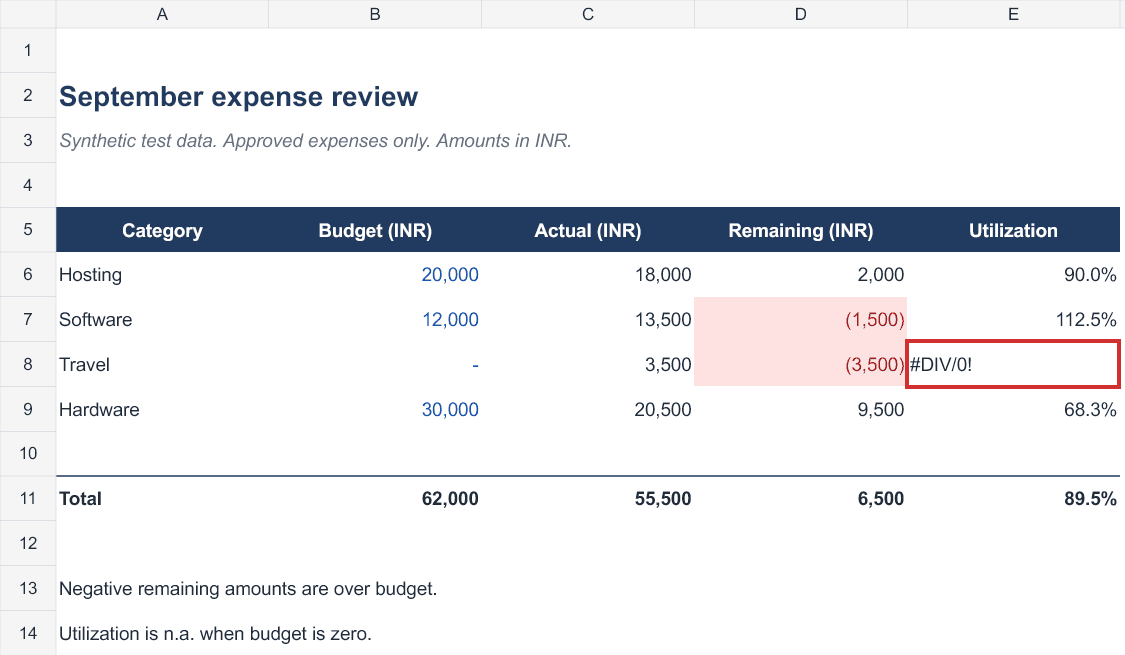 The workbook qwen2.5:14b saved, drawn from the file itself. Its report said Travel utilization now shows “n.a.”; the saved cell still shows #DIV/0!. The red outline is mine.
A wrong answer is easy to spot. A false "done" is not. Read the diff, run the tests yourself, and open the saved file.
Three failures with three different causes
In Jan, I asked qwen3.5:9b to repair an inventory workbook. The same model had scored 12/12 on
this task through a minimal test harness. In Jan it failed three times, each for a different reason:
- Context ran out. A single inspection tool returned about 16,000 characters, and the attempt used up all 16,384 tokens of context before making any edit.
- Output cap. Jan's assistant allowed 2,048 output tokens. The model spent all of them reasoning and never called a tool.
- Formulas saved as text. With the cap raised to 4,096, it saved the file, but it wrote formulas
without the leading
=, so they were stored as text. Four of ten checks passed.
For the fourth attempt I changed only the tools. I added two: a compact cell reader, and an
editor that rejects any formula without = and saves nothing if an edit is invalid. The editor
rejected the model's first attempt, which was the same mistake as attempt 3. The model corrected
it and passed 10/10. A guardrail in the tool worked where prompting alone had not.
The autocomplete that wasn't local
My first autocomplete test "passed": suggestions appeared in under a second. They were coming from
GitHub Copilot, which is built into current VS Code and was signed in on the free plan. The local
model had never loaded. After I turned Copilot off ("chat.disableAIFeatures": true), the local
7B model served suggestions in 0.19–0.93 seconds once it was loaded. The first suggestion after a
pause can take around 20 seconds while the model loads. Raising Twinny's keep-alive to 30 minutes
made that happen less often. A suggestion that appears in under a second right after a cold start
is a sign that something other than your local model is answering.
Uploading is not embedding
My first document test in AnythingLLM answered "I don't have access to documents" to all four questions. The files had been uploaded and parsed, but never added to the workspace, so nothing was embedded. After I used Move to Workspace → Save and Embed and switched the workspace to Query mode, it answered 4/4 correctly with citations. One of the two documents was a superseded version of the other, and it chose the current revision even when the old one ranked first in the search. This was a two-document test, so it shows the answers stay grounded in the documents, not that retrieval works at scale.
A code index lost to plain search
I indexed a Django repository in AnythingLLM and asked five questions with a hidden answer key. Only 100 of the 136 files made it into the workspace, and it scored 2.5/5 in about nine minutes. The same 9B model, searching the files live through OpenCode, scored 4.5/5 in 2 minutes 41 seconds. I dropped the code index. For questions about code, I ask the coding agent and tell it not to modify files.
A tool call written as plain text
In T3, devstral-small-2:24b wrote its first tool call as ordinary text (glob{"path": ...})
instead of calling the tool, and then stopped. It scored 7/19, the same as the untouched starting
code. Inside T3 it also ran at only 2.3–2.5 tokens per second. A model listed as supporting tools
still has to use them correctly inside the app you actually run.
I had seen the same failure in my first setup, in August, with a different model:
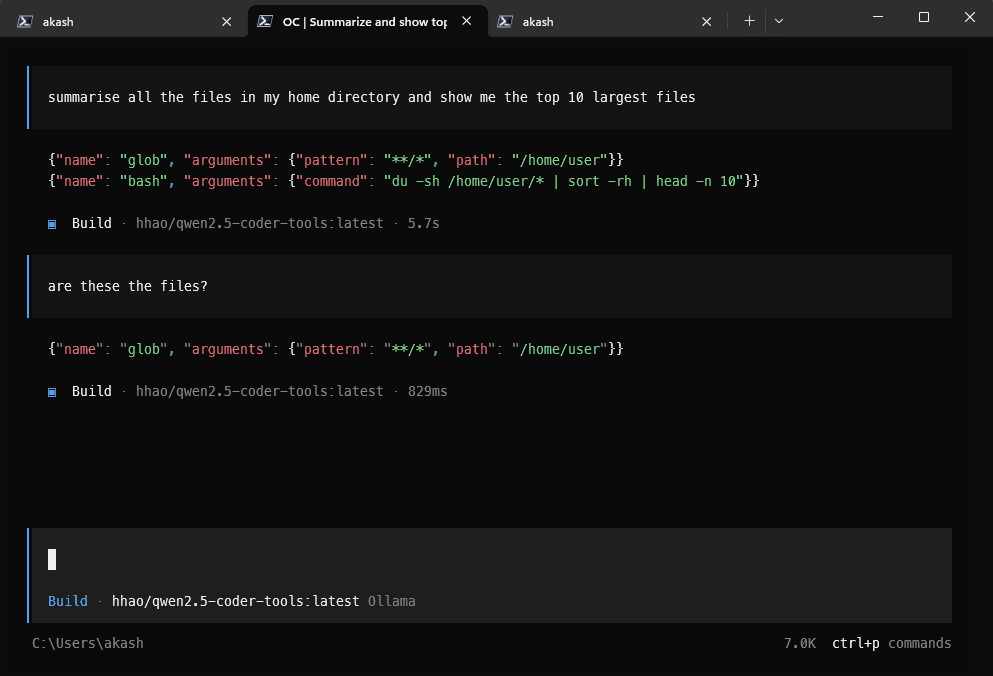 August, OpenCode with hhao/qwen2.5-coder-tools: the tool calls come out as JSON text, so nothing runs, and the paths are Linux paths on a Windows machine. That model is no longer in my setup.
Coding workflows that held up
- Docstrings. I put the style rules (Google style for Python, TSDoc for TypeScript) in OpenCode's global instructions file and in a user-level Ruff configuration. Given a file and no style details in the prompt, the 30B brought Ruff's docstring findings from 8 to 0 and left the code itself unchanged. The docstrings still need reading: one repeated a misleading function name.
- Scaffolding. A template prompt walks the model from model to form or serializer, then views
and URLs. The first plain-Django run scored 13/16: the wiring was correct, but it added logic to a
stub, skipped type hints and left unused imports. I added closing rules to the template (one-line
class docstrings, stub bodies that only raise
NotImplementedError, run Ruff aftermanage.py check). With those, a Django REST Framework scaffold scored 14/14 in 7 minutes. - Bigger changes. On a four-file task (a parser bug, a new rule, a cross-file feature and tests), the 30B scored 19/19 twice. For work spread across many files, or that needs design judgement across a codebase, I still switch to a cloud model and bring the smaller follow-ups back to the local ones.
Reproduce it
This is the shortest route I know, written from the configuration that passed. I have not yet rebuilt it from scratch on a second machine. Each step ends with a check, so you can tell whether it worked.
1. Ollama. Install it and set these user environment variables:
| Variable | Value |
|---|---|
OLLAMA_CONTEXT_LENGTH | 16384 |
OLLAMA_FLASH_ATTENTION | 1 |
OLLAMA_KV_CACHE_TYPE | q8_0 |
OLLAMA_ORIGINS | http://tauri.localhost (see the warning below) |
OLLAMA_MODELS | optional: a folder on a data drive |
A warning about OLLAMA_ORIGINS. In my setup I used *, which fixed a 403 error in Jan. But *
also lets any website open in your browser send requests to Ollama in the background, including
requests that delete models or start large downloads. Only Jan needed a change. Ollama's built-in
list already allows localhost and tauri:// origins, but not http://tauri.localhost, which
appears to be what Jan's Windows app sends, and that matches the 403 I saw. I tested this on a
temporary Ollama server. With OLLAMA_ORIGINS=http://tauri.localhost, that origin got through and
an ordinary website was still blocked; with *, both got through. I have not re-run Jan itself
with the narrower value. If Jan shows a 403 with it, check which origin Jan sends before falling
back to *.
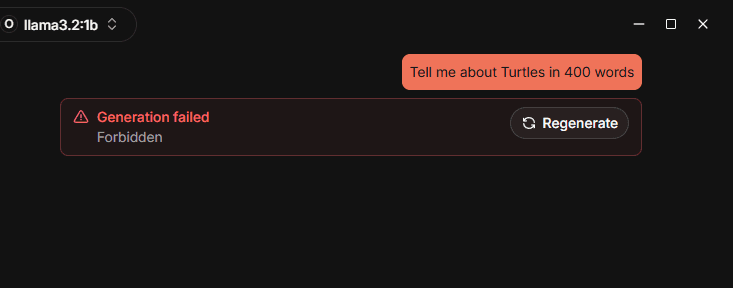 The 403 in Jan, from my first setup in August, before I changed OLLAMA_ORIGINS.
Also set the context slider in Ollama's settings to 16K. Then quit Ollama completely, including
the tray icon, and start it again. A process started before the change keeps the old environment.
This caught me out three times. Check: after loading a model, ollama ps shows context 16384
and 100% GPU for the 9B.
2. Models. Download three models (qwen3.5, qwen3-coder, qwen2.5-coder), then create two 32K variants:
ollama pull qwen3.5:9b
ollama pull qwen3-coder:30b
ollama pull qwen2.5-coder:7b-base
ollama create qwen3.5:9b-32k -f Modelfile.qwen3.5-9b-32k
ollama create qwen3-coder:30b-32k -f Modelfile.qwen3-coder-30b-32k
Each Modelfile has two lines, for example:
FROM qwen3.5:9b
PARAMETER num_ctx 32768
Check: ollama list shows five entries, and ollama show qwen3.5:9b-32k --parameters shows
num_ctx 32768.
3. T3 Code with OpenCode. Declare the two 32K models in ~/.config/opencode/opencode.json,
with a 4,096-token output reserve:
{
  "$schema": "https://opencode.ai/config.json",
  "provider": {
    "ollama": {
      "npm": "@ai-sdk/openai-compatible",
      "name": "Ollama Local",
      "options": { "baseURL": "http://localhost:11434/v1" },
      "models": {
        "qwen3.5:9b-32k": { "name": "Qwen 3.5 9B Local 32K", "limit": { "context": 32768, "output": 4096 } },
        "qwen3-coder:30b-32k": { "name": "Qwen 3 Coder 30B Local 32K", "limit": { "context": 32768, "output": 4096 } }
      }
    }
  }
}
Enable the OpenCode provider in T3. Quit T3 completely and reopen it, because it does not refresh
its model list otherwise. A new thread copies the model of the thread you are viewing, so check the
model button before you send. T3's default permission mode, Full access, runs shell commands and
edits without asking; choose the mode for each thread deliberately. If you script OpenCode, run
opencode run ... < /dev/null, otherwise it waits forever for input. Check: ask for a one-line
file in a scratch project and confirm the exact text on disk.
4. Jan. Add Ollama as a provider at http://localhost:11434/v1, select qwen3.5:9b and turn on
its tools and vision capabilities. Raise the assistant's maximum output tokens to 4,096.
Check: a normal chat reply, and a correct answer about a screenshot.
5. AnythingLLM. Choose Ollama (http://127.0.0.1:11434, model qwen3.5:9b), the built-in
embedder and LanceDB. Create a workspace in Query mode, and after uploading use Move to
Workspace → Save and Embed. Check: a question whose answer is in one document comes back with a
citation.
6. VS Code autocomplete. Install Twinny and add one fill-in-middle provider: Ollama on
localhost:11434, path /api/generate, model qwen2.5-coder:7b-base, template automatic. Leave out
Twinny's chat. In settings, add "twinny.keepAlive": "30m" and "chat.disableAIFeatures": true.
Keep error hints deterministic with a linter and type checker (I use Ruff, Pylance and ErrorLens).
Check: suggestions within a second once the model is loaded.
Tested versions: Ollama 0.34.3, OpenCode 1.18.32, T3 Code 0.0.42, Jan 0.8.4, AnythingLLM 1.16.1, Twinny 4.2.5 (it has since updated itself to 4.2.7).
Limits
- One machine, small fixtures, mostly single runs. Results varied between runs: the same 9B that scored 12/12 deleted a test on a repeat.
- The 32K context fills up on bigger tasks: the largest runs came close to the limit and compacted.
- T3's "Auto-accept edits" mode was never exercised with a local model. Every run used Full access.
- Local models have no web access, so anything that depends on recent releases or current documentation goes to a cloud model.
- Apps update themselves. Twinny updated during testing and again before I wrote this. Re-run the checks after an update.
What I didn't use, and why
- Other runtimes. I did not compare Ollama with LM Studio or llama.cpp's own server. Every app here could talk to Ollama, so I kept one runtime and spent the time testing the apps. Another runtime may be faster on the same card; I haven't measured it.
- Open WebUI. It needs Docker, which I didn't want on this machine.
- An agent inside the editor. Cline was my main assistant in the earlier setup; I replaced it with T3, where agent work happens in its own threads and I review the diffs. VS Code keeps autocomplete and deterministic hints only. I have not tested Continue in this setup.
- A model as a linter. Ruff, Pylance and ErrorLens are instant and never invent a rule. A model would be slower and less predictable at the same job.
- A code index. Tested above: it lost to the agent searching the files live.
What I would tell myself at the start
- Fix the context length before judging any model.
- Run a control task before blaming a model for a failure.
- Trust files, diffs and tests over summaries, including your own notes.
- Change one thing per retry, and keep the failures.
- Fewer models, each with a job, beat a large collection nobody has tested in the apps you actually use.
About the author
I'm Akash Damle, founder of Matalli Infotech Private Limited, an early-stage company I'm building from the ground up. I write to mark milestones: what was built, what broke, and what it taught me.
If you follow this setup, especially on different hardware, I would like to hear how it went: what you ran, what happened, and what you changed. Disagreement is as welcome as agreement, as long as it comes with a reason. Reports like that are how the next version of this guide gets better.
Comments
Tried this setup, hit a different result, or think something here is wrong? Say what you ran, what happened, and why. Agreement and disagreement are equally welcome; one-line reactions are not published. No account needed.